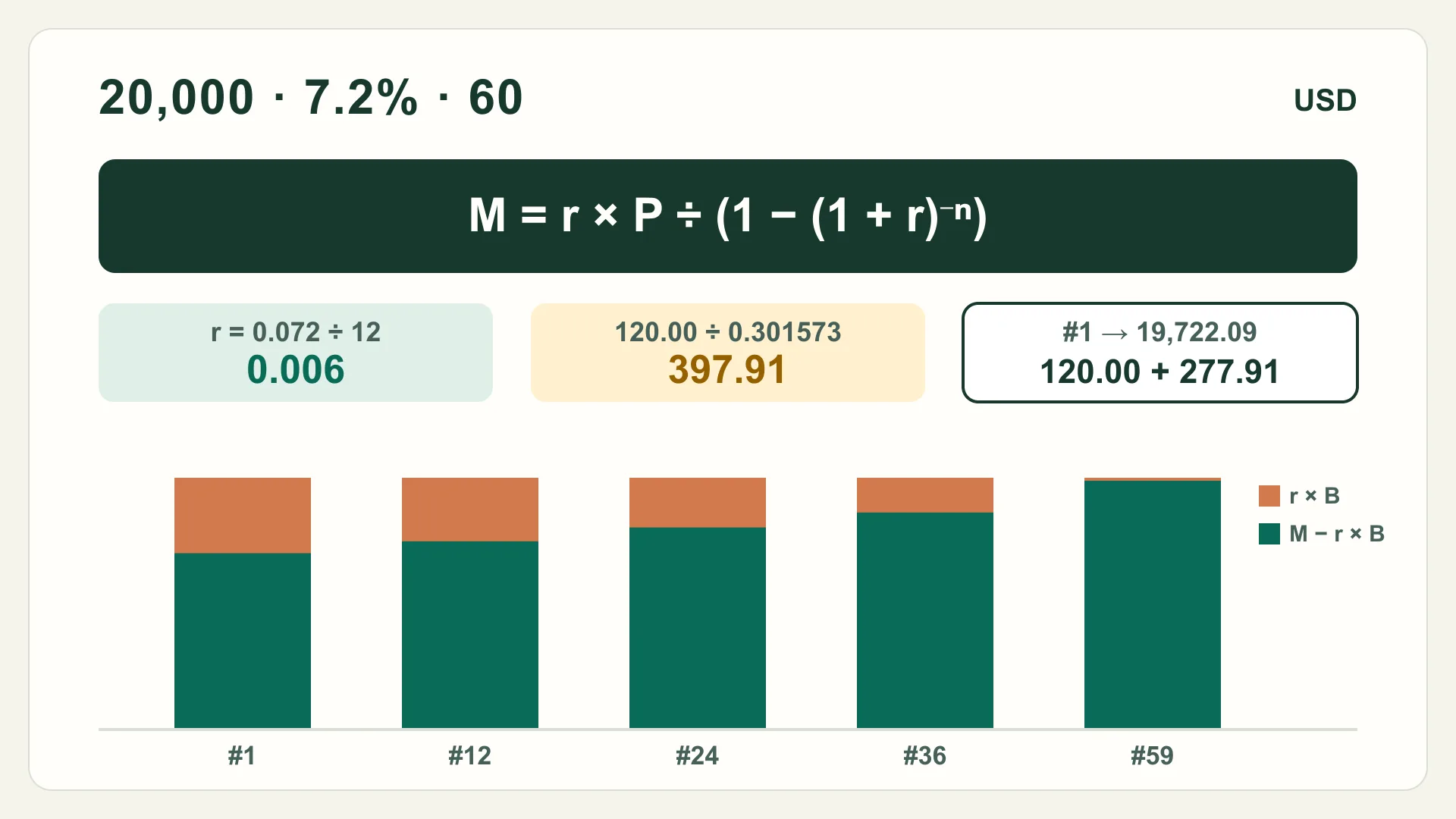
Most car loans, personal loans and many other installment loans in the U.S. are repaid in equal monthly payments. The interest each month is charged on the balance still owed. One formula gives that fixed payment, and two lines of arithmetic split each payment into interest and principal. This guide works through both with a hypothetical U.S.-dollar loan, so you can check a lender's figures or a calculator's output yourself.
It covers fixed-rate, simple-interest (amortizing) loans. Mortgages with escrow, adjustable rates, interest-only periods and precomputed-interest contracts follow different rules, described at the end.
Step 1: gather three numbers
- P, the amount borrowed (the amount financed on your disclosure, including any fees that were rolled into the loan).
- The annual interest rate on the note. Use the interest rate, not the APR. The CFPB explains that the APR is the interest rate plus additional fees charged with the loan, which makes it a comparison measure rather than the rate applied to your balance.
- n, the number of monthly payments, for example 60 for a five-year loan.
Also confirm the interest method. The CFPB notes that simple interest, calculated on the outstanding balance daily or monthly, is far more common than precomputed interest, where the total interest is set at the start. The formula below describes simple-interest loans.
Step 2: convert the annual rate to a monthly rate
Divide the annual rate by 12 and write it as a decimal: r = annual rate ÷ 12. For 7.2%, r = 0.072 ÷ 12 = 0.006.
Step 3: apply the payment formula
M = r × P ÷ (1 − (1 + r)−n)
Work it in four small pieces. With P = $20,000, r = 0.006 and n = 60:
| Piece | Calculation | Result |
|---|---|---|
| Growth factor | (1 + 0.006)60 | 1.431788 |
| Discount factor | 1 ÷ 1.431788 | 0.698427 |
| Denominator | 1 − 0.698427 | 0.301573 |
| First month's interest | 0.006 × 20,000 | 120.00 |
| Monthly payment M | 120.00 ÷ 0.301573 | 397.91 |
A spreadsheet gives the same answer (see checking it in Excel or Google Sheets below). The loan repayment calculator runs this formula and the full schedule in your browser.
Step 4: split each payment into interest and principal
Each month, interest = current balance × r, rounded to the cent, and principal = M − interest. The new balance is the old balance minus that principal. Because the balance shrinks, the interest part falls and the principal part rises every month, even though the payment stays the same.
| Payment | Payment amount | Interest | Principal | Balance after |
|---|---|---|---|---|
| 1 | 397.91 | 120.00 | 277.91 | 19,722.09 |
| 2 | 397.91 | 118.33 | 279.58 | 19,442.51 |
| 3 | 397.91 | 116.66 | 281.25 | 19,161.26 |
| 12 | 397.91 | 101.10 | 296.81 | 16,552.81 |
| 24 | 397.91 | 79.01 | 318.90 | 12,849.07 |
| 36 | 397.91 | 55.27 | 342.64 | 8,869.66 |
| 59 | 397.91 | 4.73 | 393.18 | 395.85 |
| 60 | 398.23 | 2.38 | 395.85 | 0.00 |
Over the 60 payments, this hypothetical loan costs $23,874.92 in total, of which $3,874.92 is interest. The last payment is 32 cents higher because cent rounding leaves a small remainder that a final adjustment clears. Real lenders handle that remainder in different ways.
Step 5: find the balance after any payment
You don't need to build every row to know where the loan stands. After k payments:
Balancek = P × (1 + r)k − M × ((1 + r)k − 1) ÷ r
After 24 payments: 20,000 × 1.154387 − 397.91 × 25.731215 ≈ 23,087.75 − 10,238.71 = $12,849.04. That is 3 cents away from the schedule's $12,849.07, because the schedule rounds each month's interest. For a payoff, use the lender's payoff quote, which reflects actual payment dates, daily interest and any fees.
How the term changes the monthly payment
The same formula shows the trade-off between term and cost. For the hypothetical $20,000 at 7.2%, a longer term lowers the monthly payment but adds interest, because the balance is paid down more slowly.
| Term | Monthly payment | Total interest | Total paid |
|---|---|---|---|
| 36 months | 619.37 | 2,297.42 | 22,297.42 |
| 48 months | 480.78 | 3,077.58 | 23,077.58 |
| 60 months | 397.91 | 3,874.92 | 23,874.92 |
| 72 months | 342.90 | 4,689.11 | 24,689.11 |
Work backward: the loan amount a monthly payment covers
Rearranging the payment formula gives the amount borrowed that a fixed payment repays over n months:
P = M × (1 − (1 + r)−n) ÷ r
For a hypothetical $400 a month at 7.2% for 60 months: 1 − (1.006)−60 = 0.301573, divided by 0.006 is 50.262130, and 400 × 50.262130 = $20,104.85. The same $400 covers about $12,916.30 over 36 months, $16,639.53 over 48 months and $23,330.14 over 72 months.
That result is the amount financed. Taxes, fees or add-ons rolled into the loan count toward it, so the price of what you buy would be lower by those amounts. It shows the arithmetic only. It isn't a borrowing limit or a recommendation, and lenders set their own approval criteria.
Check it in Excel or Google Sheets
Excel's PMT function takes PMT(rate, nper, pv). Microsoft's page notes that for monthly payments you divide the annual rate by 12, and that the result includes principal and interest but no taxes, reserve payments or fees. For the example, =PMT(0.072/12, 60, -20000) returns 397.91.
To work backward, the PV function takes PV(rate, nper, pmt): =PV(0.072/12, 60, -400) returns 20,104.85. The minus signs follow Microsoft's convention that cash you pay out is a negative number. Google Sheets has PMT and PV functions with the same arguments in the same order.
Why the lender's numbers can differ slightly
- Daily interest. Many simple-interest loans accrue interest daily, so an early or late payment shifts the interest and principal split for that month.
- Rounding and the final payment. Lenders round to the cent and adjust the last payment differently.
- Fees and add-ons. Items financed into the loan raise P. Fees paid separately do not change the payment, but they do raise the APR.
- First-period length. A first payment due more or less than a month after funding changes the first month's interest.
If the payment you calculate is more than a few dollars away from the disclosed one, ask the lender which amount financed, rate and method they used before you sign. To see how extra payments are applied, read the guide to checking extra car-loan payments. To compare one new loan with several existing debts, use the debt consolidation break-even guide.
Turn the page into action
Check a loan payment yourself
- Copy the amount financed, interest rate, term and first due date from the loan documents.
- Confirm the loan uses simple (amortizing) interest, not precomputed interest.
- Convert the annual rate to a monthly rate: r = rate ÷ 12.
- Compute (1 + r)^−n, then M = r × P ÷ (1 − (1 + r)^−n).
- Build the first rows: interest = balance × r, principal = M − interest.
- Compare M with the disclosed payment and ask about any gap above a few cents.
- Use the balance formula, then confirm with a statement or payoff quote.
Boundaries
The figures are hypothetical, in U.S. dollars, and show arithmetic, not a loan offer or a recommendation. The formula fits fixed-rate loans with equal monthly payments and simple interest. It does not describe precomputed-interest contracts, adjustable-rate or interest-only loans, mortgages with escrow for taxes and insurance, credit cards, or loans with balloon payments. Your loan agreement, Truth in Lending disclosure and statements govern the actual amounts.
Evidence to action
Methods and evidence
Methods used
- Amortizing payment
payment = periodicRate × principal ÷ (1 − (1 + periodicRate)^−periods) - Loan balance after k payments
B_k = P × (1 + r)^k − M × ((1 + r)^k − 1) ÷ r - Loan amount from a payment
principal = payment × (1 − (1 + periodicRate)^−periods) ÷ periodicRate
Next actions
Structured datasources.jsonformulas.jsonsystems.json
Evidence
Sources
- What is the difference between a loan interest rate and the APR?
cfpb-loan-aprConsumer Financial Protection BureauAccessedNovember 18, 2026
- Simple and precomputed interest on auto loans
cfpb-auto-interest-methods-2024Consumer Financial Protection BureauAccessedNovember 18, 2026
- PMT function
microsoft-excel-pmtMicrosoftAccessedNovember 18, 2026
- PV function
microsoft-excel-pvMicrosoftAccessedNovember 18, 2026
- PMT - Google Docs Editors Help
google-sheets-pmtGoogleAccessedNovember 18, 2026
- PV - Google Docs Editors Help
google-sheets-pvGoogleAccessedNovember 18, 2026
Common questions
Frequently asked questions
What is the formula for a monthly loan payment?
For a fixed-rate loan repaid in equal monthly installments, payment = r × P ÷ (1 − (1 + r)^−n), where P is the amount borrowed, r is the annual interest rate divided by 12, and n is the number of monthly payments.
Should I use the APR or the interest rate in the formula?
Use the note's interest rate to calculate the payment. The CFPB explains that the APR adds certain fees charged with the loan, so it is a cost-comparison measure rather than the rate applied to your balance each month.
Why is my lender's payment a few cents different?
Lenders round each payment and each month's interest to the cent, may accrue interest daily rather than monthly, and often adjust the final payment. Small differences are normal; ask the lender for their method if the gap is larger.
How do I find the remaining balance after some payments?
Balance after k payments = P × (1 + r)^k − M × ((1 + r)^k − 1) ÷ r, where M is the monthly payment. Your statement or a payoff quote is the authoritative figure, because it includes actual payment dates and any fees.
How do I calculate the loan amount from a monthly payment?
Rearrange the payment formula: P = M × (1 − (1 + r)^−n) ÷ r. For example, $400 a month at 7.2% (r = 0.006) for 60 months repays about $20,104.85 of amount financed, including any taxes or fees rolled into the loan.